
My AI agent said it was done. My Mac's fans disagreed.
Coding agents start dev servers, watchers and containers to test their work. When the session ends, some of them keep running. Here's why, and how to find them with nothing but ps and lsof.
By Zernonia · November 10, 2026 · 9 min read
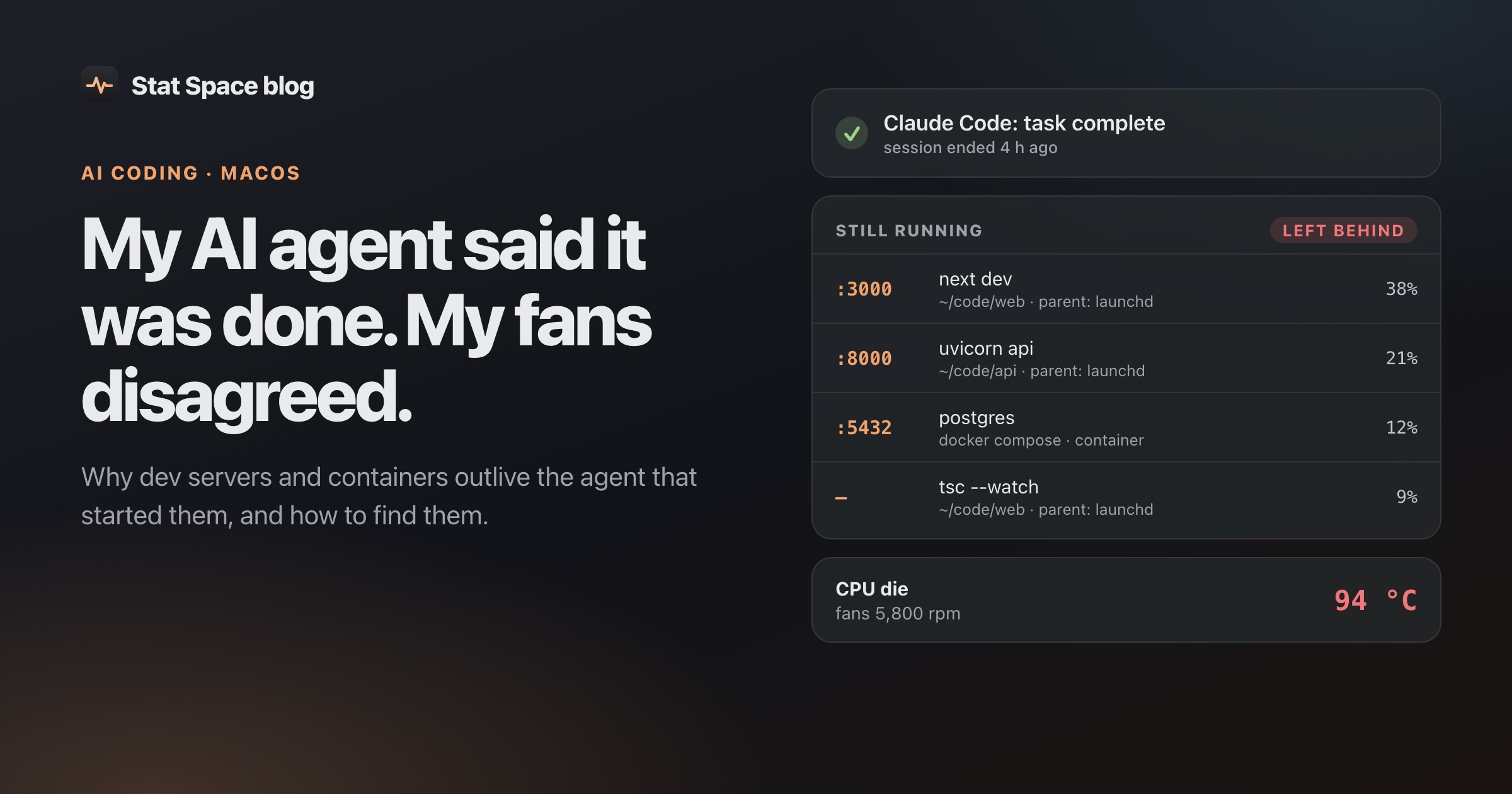
Claude Code had finished. The terminal was quiet, the diff looked fine, and my MacBook was hot enough that I moved it off my lap. The fans were going like it was rendering video, and CPU and memory were still pinned.
Activity Monitor didn’t help much. It showed a wall of node, docker and helper processes, none of them obviously mine, none of them saying where they came from. So I did what I’d do with any bug: I asked Claude to help me find the root cause, and we walked the process tree together.
The answer was boring and a little embarrassing. An earlier agent session, one I’d closed hours before, had started Docker containers and a handful of microservices to test its changes. When that session ended, nobody stopped them. They had been running all afternoon, using CPU and memory and heating the whole machine, while I blamed the session in front of me.
Killing them fixed it that night. But this wasn’t a one-off, and it isn’t specific to Claude Code. Any agent that can run shell commands can do this. This post is about why it happens, how to find the leftovers yourself, and what I built so I don’t have to do it by hand.
Why the servers outlive the agent
To check its own work, an agent does what you’d do: npm run dev, vite, tsc --watch, docker compose up -d, maybe a Python API on :8000. Some of those it tracks as background tasks. Some of them detach from it on purpose.
Then the session ends, and three different things can happen to what it started:
- The process was a direct child and gets cleaned up. This is the case everyone assumes.
- The process was a child, but the parent exits without killing it. On Unix, a process doesn’t die when its parent does. It’s re-parented to PID 1, which on macOS is
launchd, and it keeps running with its parent PID now set to 1. If there’s no terminal hangup to deliver aSIGHUP, or the process ignores it (nohup,&anddisown, a tool that daemonizes itself), nothing ever tells it to stop. - The process was never the agent’s child at all.
docker compose up -dasks the Docker daemon to start containers. On a Mac those run inside Docker’s Linux VM, so they don’t even show up as processes in Activity Monitor. You see the VM using CPU, not the containers inside it.
The second case is the one that makes debugging annoying. Once a process has been re-parented, the parent chain is gone. ps can tell you it belongs to launchd, but not that a Claude Code session in ~/code/api started it four hours ago. The evidence has already been erased by the time you go looking.
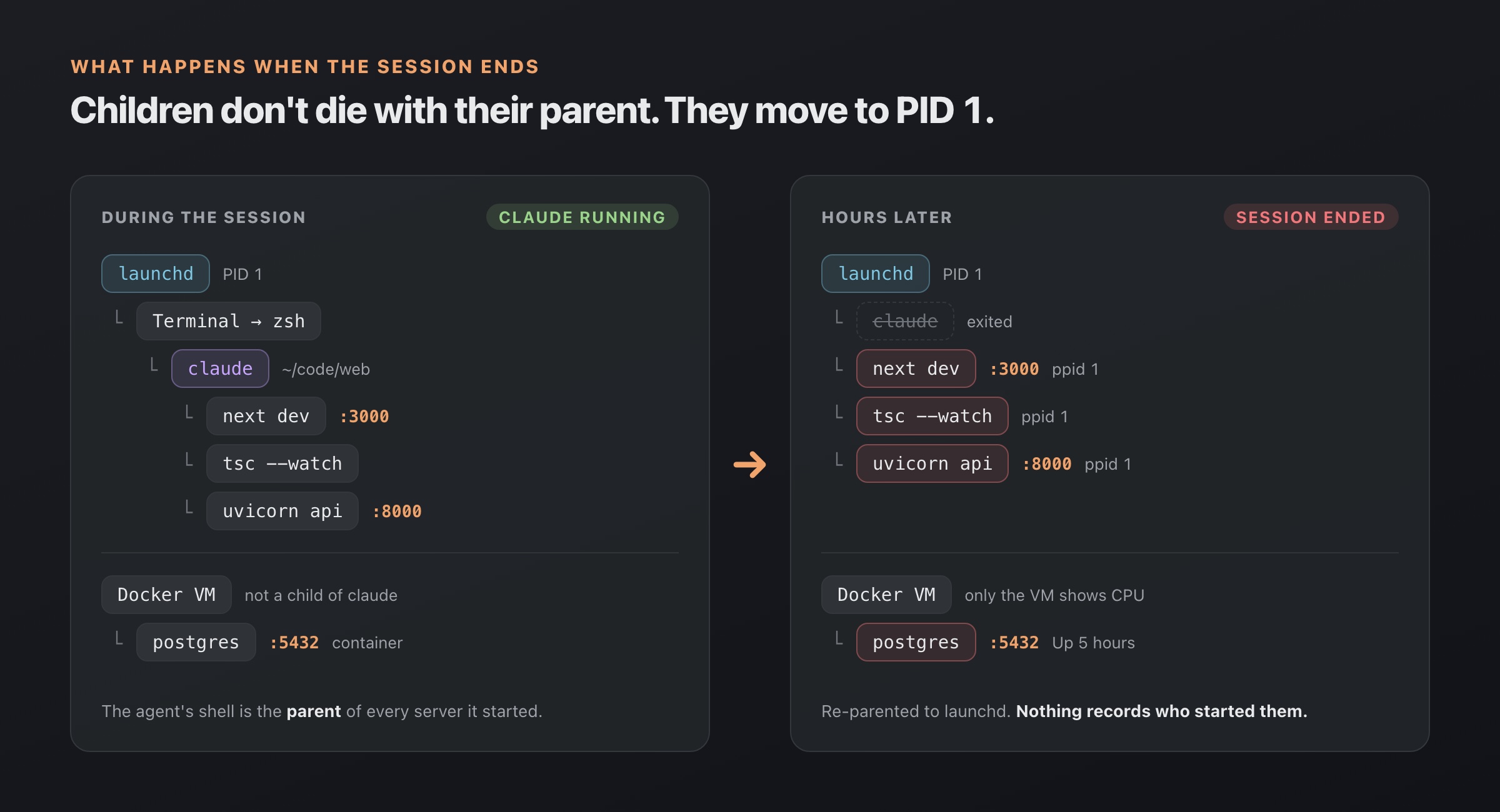
When the agent exits, its servers are re-parented to launchd and the container keeps running in Docker’s VM.
Finding leftovers yourself
You don’t need any tools for this. Here’s the sequence I ended up with.
1. What’s still listening
Leftover servers usually hold a port, so start there:
lsof -nP -iTCP -sTCP:LISTEN-n and -P skip DNS and port-name lookups, which makes it fast and shows :3000 instead of a service name. Anything on 3000, 5173, 8000 or 8080 you didn’t start is a suspect. To see which project a PID belongs to, ask for its working directory:
lsof -a -p <PID> -d cwd -Fn | tail -12. Orphans: your dev tools whose parent is PID 1
This is the most useful single check. Normal processes have a real parent (your shell, your editor). Processes whose parent PID is 1 are either real launchd jobs or something that lost its parent:
pgrep -u "$USER" -P 1 -lf 'node|vite|tsc|python|ruby|bun|deno'For more detail, including how long each one has been running:
ps -u "$USER" -o pid,ppid,etime,rss,command | awk 'NR==1 || $2==1' \
  | grep -Ev '\.app/|/System/|/usr/(libexec|sbin)/'
etime is elapsed time and rss is resident memory in kilobytes. The grep drops GUI apps, their helpers and macOS’s own agents, which are legitimately launched by launchd.
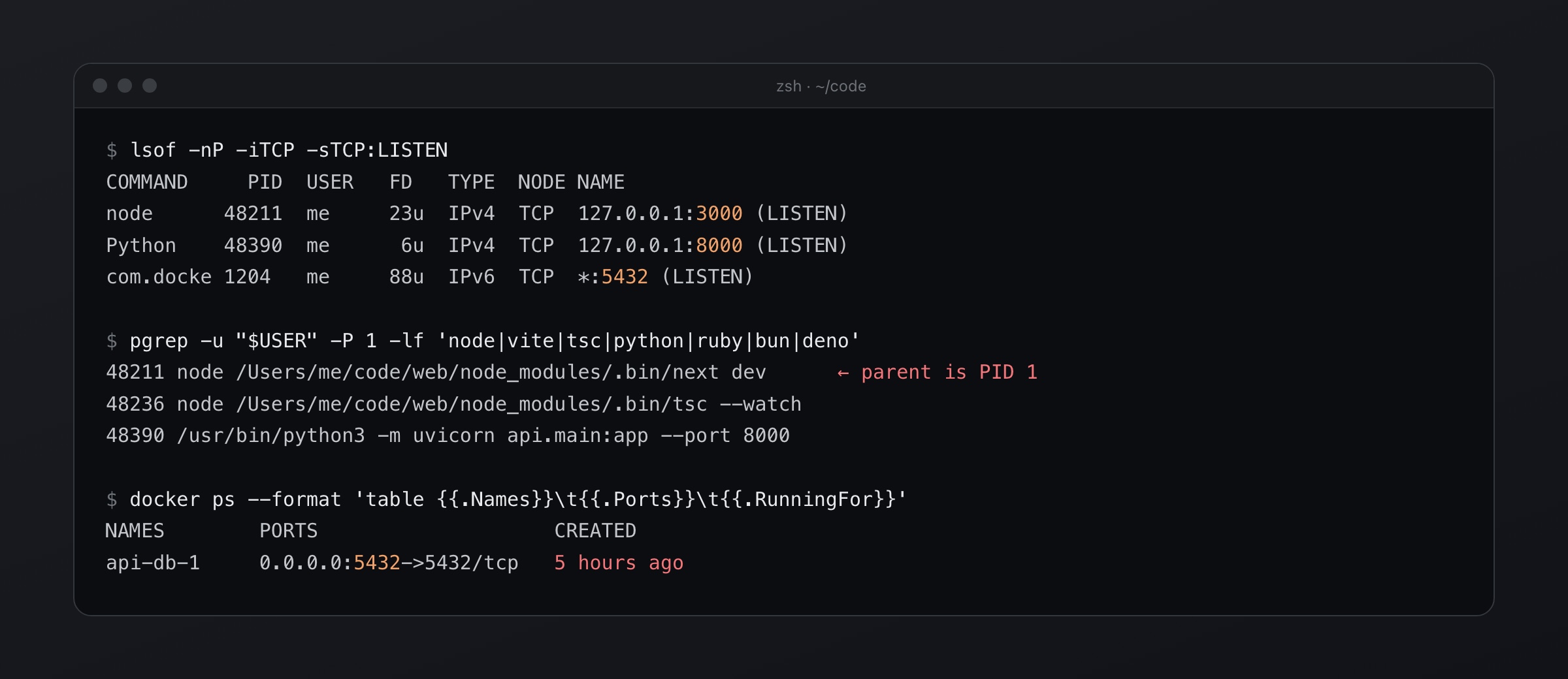
Three commands find most leftovers: what’s listening, what has parent PID 1, and which containers are older than your session.
3. The parent chain, while it still exists
For a process that hasn’t been orphaned yet, walk up to see who started it:
pid=<PID>
while [ "$pid" -gt 1 ]; do
  ps -o pid=,ppid=,command= -p "$pid"
  pid=$(ps -o ppid= -p "$pid" | tr -d ' ')
done
If you see claude, codex or cursor-agent in that chain, an agent started it. If the chain stops immediately at PID 1, see step 2.
4. Containers
Because containers don’t show up as Mac processes, ask Docker directly:
docker ps --format 'table {{.Names}}\t{{.Ports}}\t{{.RunningFor}}'
docker stats --no-stream
docker compose down   # from the project folder
RunningFor is the giveaway. A database container “Up 5 hours” when you’ve only been working for one means someone else started it, and that someone was probably your previous agent session.
5. Stopping things safely
Send SIGTERM first so servers get a chance to shut down cleanly, and only use kill -9 on what ignores it. Before you kill anything with parent PID 1, check that it’s actually a dev tool you recognize. Plenty of legitimate user agents (sync clients, password managers) also run under launchd.
There’s a more complete walkthrough, including a SessionEnd hook that records what was listening when a session ended, in how to clean up after a Claude Code session.
Doing it before the evidence disappears
The manual method works, but it has a timing problem: by the time you notice the heat, the parent chain is already gone. So when I built Stat Space, a menu bar system monitor for Apple Silicon, I wanted it to remember the chain while it still existed.
The Agents tab does that. Each tick that processes are sampled, it looks for agent root processes (Claude Code, Codex, Cursor, Aider, Gemini CLI and opencode are matched by binary name and command-line patterns) and records every descendant it ever sees, keyed by PID and start time. When the agent exits and its children get re-parented to launchd, the app still knows which session they came from.
The start time matters more than it looks. PIDs get reused, so “PID 48211 was a child of Claude Code” is only true for the process that had that PID when the app saw it. Every lookup and every kill checks that the start time still matches.
A remembered descendant only becomes a leftover if three things are true:
- its session has ended,
- it’s a dev tool (a fixed list:
node,vite,next-server,uvicorn,cargo,goplsand about a hundred more, plus interpreters running a known tool script likenode .../.bin/vite) or it owns a listening port, - it has sat under 2% CPU for 10 minutes since the session ended.
That last rule came from using it. Without it, a session that just finished showed a “Clean up” button for processes still winding down, which is noise. Now a finished session with real leftovers looks like Claude Code finished · left :3000 and :5555 running, with one button.
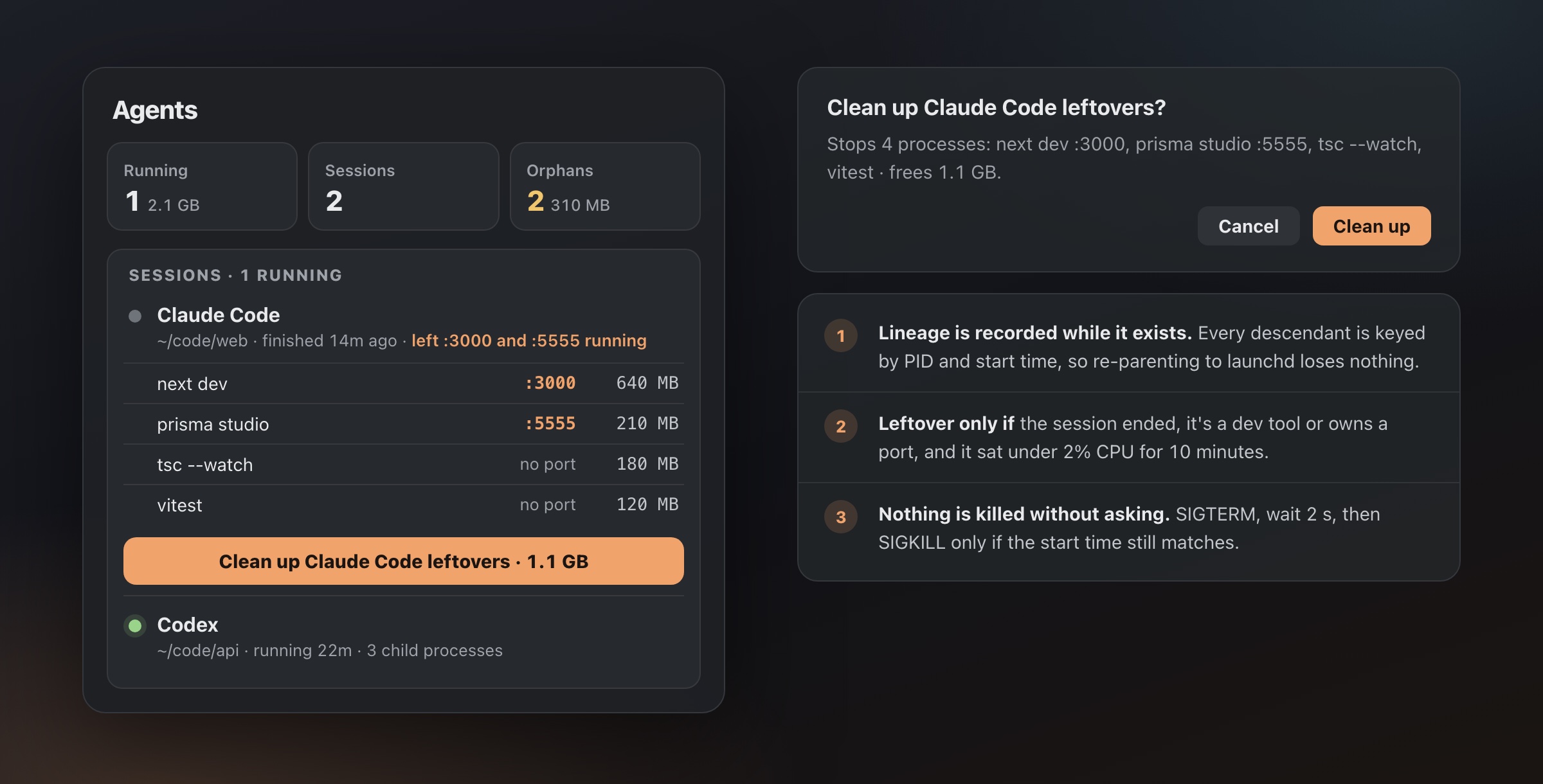
The Agents tab lists what a finished session left behind and asks before stopping anything.
Orphans the app never saw being born
Not every orphan comes from a session the app watched. Maybe it started before Stat Space did, or the terminal was closed hours ago. The orphan sweep handles those, and it’s deliberately conservative. A process is listed only if it:
- has parent PID 1 and belongs to the current user,
- is a dev tool by the same matcher, and isn’t inside an
.appbundle or a system path, - is at least a minute old,
- and wasn’t started by launchd on purpose.
That last check is the subtle one. A node process run by your own LaunchAgent also has parent PID 1, and it’s not an orphan. macOS tracks a “responsible process” for every PID, and a launchd job is responsible for itself, while a process orphaned from a terminal still names the terminal app as responsible. So if Stat Space has seen a dev tool with a real parent before, it knows it was orphaned. If it’s first seen already under launchd, it’s only listed when its responsible process isn’t itself.
Kill safety
Showing leftovers is easy. Stopping them without ever stopping the wrong thing is the part I spent the most care on. Every kill path in the app (orphan sweep, agent cleanup, killing whatever is on a port) goes through one last check that refuses:
| Refused | Why |
|---|---|
| PID 0 or 1, root-owned, or a system path | system processes are never touched |
| another user’s process | not yours to kill |
| Finder, Dock, WindowServer, loginwindow and friends | you own them, but killing them is never what you meant |
| Stat Space itself | obviously |
Then it asks you. “Kill 3 orphans?” is a real confirmation, not a toast after the fact. It sends SIGTERM, waits two seconds, and sends SIGKILL only to processes that are still alive and still have the same start time.
That confirmation earned its keep once already. A sampling optimization skipped processes inside app bundles while the popover was closed, and Claude Code run by the Claude desktop app lives inside one. The Agents tab read that as the session exiting and offered to clean up its MCP servers, while the session was still running. Nothing was killed, because nothing is killed without asking, and session liveness now comes from the full process table. Confirm-before-kill is the rule I’d least want to give up.
Letting the agent check its own mess
The part I find most satisfying: the agent can now do the root-cause hunt itself. Stat Space ships a small statspace CLI, and the same binary runs as an MCP server over stdio:
claude mcp add --scope user statspace -- /Applications/StatSpace.app/Contents/Helpers/statspace --mcpThe relevant tools are agent_sessions (running and recently ended sessions, their child processes, ports and leftovers), orphans, list_ports, whats_on_port, kill_port and cleanup_agent_leftovers. The destructive ones don’t trust the model. Called without confirm: true, they return a description of what would be killed plus “Nothing has been killed yet. Ask the user to confirm”, and the same kill-safety check applies when they do run.
So “what did my last session leave running?” gets a straight answer, and so does “is anything already on :3000?” before the agent starts yet another server on :3001. In a terminal, statspace agents, statspace orphans and statspace cleanup <session> do the same. More on the setup in the MCP server guide.
What it doesn’t do: stop Docker containers. The Pro tier maps published ports to container names through the Docker Engine API, so you can see that :5432 is api-db-1, but docker compose down is still yours to run. Containers have volumes and state, and I’d rather the app tell you than guess.
What I’d take away from this
Even if you never install anything:
- Parent PID 1 plus a dev-tool command line is the signature of a leftover. One
pgrep -P 1finds most of them. - Check ports and containers, not just processes. On a Mac, containers are invisible to Activity Monitor.
- Capture lineage early. Once a process is re-parented, nothing on the system remembers who started it.
- Tell your agent to clean up, in
CLAUDE.mdor your equivalent, and check anyway. An interrupted session never reaches its cleanup step.
Stat Space is the tool I built after that hot evening: a lean menu bar monitor with the Agents tab, orphan sweep, ports and the MCP server in the free version. It’s at statspace.app if you want it, and the Agents feature page has the details.
Questions
Why does a dev server keep running after the agent that started it exits?
On Unix, a child process doesn't die when its parent does. It's re-parented to PID 1, which is launchd on macOS, and keeps running until something stops it. Containers started with docker compose up -d were never the agent's children at all.
How do I find orphaned dev processes on a Mac?
List your own processes whose parent PID is 1 and filter for dev tools: pgrep -u "$USER" -P 1 -lf 'node|vite|python|bun'. Then check open ports with lsof -nP -iTCP -sTCP:LISTEN and containers with docker ps.
Know what your Mac is doing, without adding to it.
Free, no account. Pro is $9.99 once for the first 100 buyers.